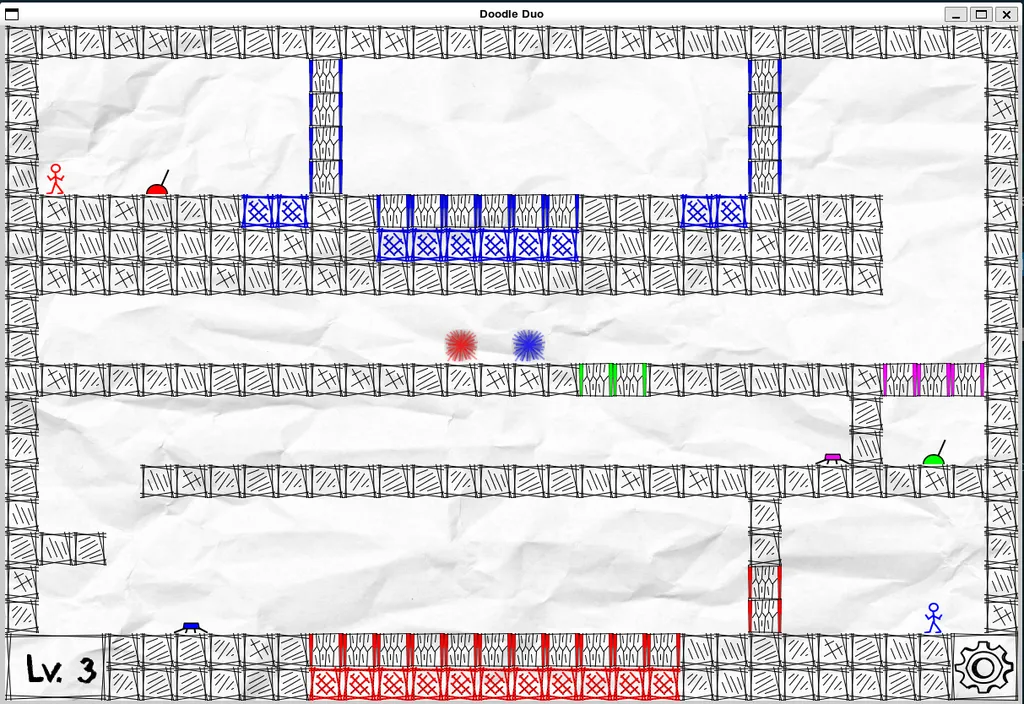
Ever wanted to code an entire game from scratch?
Introduction
As a project in my Object Oriented Programming class, we had to create something that uses what we learned (OOP). So me and my friend decided to create a game, particularly this “Fireboy & Watergirl” game, but with a new name: “Doodle Duo”. So basically, the mechanism of the game is still the same, but we changed the theme and decorations, and some tasks to simplify the workload.
So for this tutorial/breakdown, the prerequisite is just to know basic C++, and some OOP concepts like classes, inheritence, aggregation, etc. With that and you’re good to go.
First step
Our first task was to create a project plan. This plan includes the game idea, description, etc. Then we started working on the classes, which are all the objects needed in this game. So in our game, we needed characters, a map, and some blocks, obstacles, etc. After that, we had to write down all the classes and their relationships together, in a diagram called the “Class Diagram”. Below is our diagram:
Then we split the tasks, and started coding some basic stuff right away. Some really important classes to create first were: “Map”, “Game Object”, “Player”, “Game Engine”, etc.
At first, we had a lot of problems using Git & Github, as we didn’t know how to merge conflicts and go to different branches before. Our temporary solution at the time was to work at different time (lol). My friend would work on the project in the day, and I would work on it at night. But after some time, I went on Youtube to learn more about Git, and finally knew how to merge all the conflict and resolve the Git problem.
About our game mechanism and how it works. So basically, when the game started, we use a function ‘draw’ to display all the GameObjects on the window, and after each iteration, we update the objects by calling that ‘draw’ function again. But before each iteration, we listen for any user interaction, e.g. User moves the character, and update the position of that character.